Remote Access
Work from home without trusting the home network
People who work from home sit on a network their employer does not control. It often has TVs, phones and guests' computers on it. With an XoT-S1 at home, the work laptop's traffic crosses the home network encrypted, all the way to the company.
The problem
The home network is a network the company does not control
The employer does not know what equipment is in the employee's home. The router may be old and lack updates. Other devices on the same network may be compromised.
With an ordinary VPN, the work laptop and a password are often enough to get into the company network. Anyone who takes over the laptop can then move further into the company.
The solution
A Lock between the home router and the work laptop
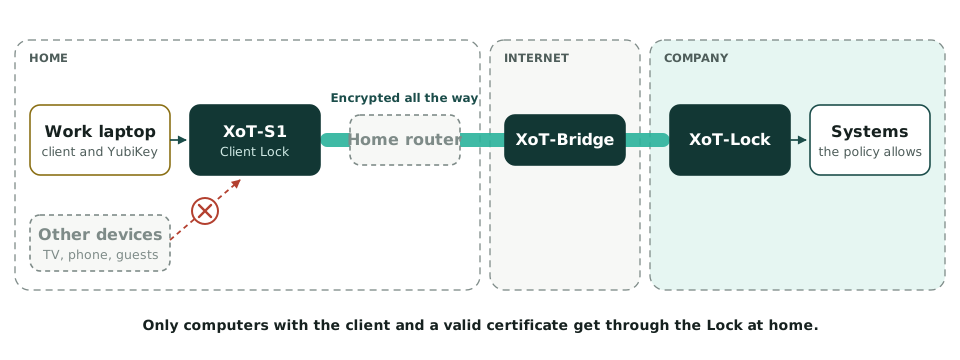
An XoT-S1 is placed between the home router and the work laptop. This setup is called Client Lock. The Lock only lets through computers that connect with XoT-Clients and can present a valid certificate.
The traffic crosses the home network and the internet encrypted to the XoT-Bridge. From there it only reaches the systems on the company network that the policy in the XMS allows.
Multi-factor authentication
The Lock at home becomes an extra factor
The company can require all connections from the internet to come through an XoT-S1. Then a laptop and a password are not enough to reach the company network.
The work laptop
The laptop has the XoT-Desktop Client and a certificate from the XMS.
The hardware key
The certificate is stored on a YubiKey or a smart card. It requires a PIN.
The Lock at home
The connection must come through an XoT-S1 the company has handed out.
Common questions
Does the employee need to change anything in the home router?
No. The XoT-S1 is connected between the home router and the work laptop. The Lock connects outbound, so no ports need to be opened.
Can others at home use the internet as usual?
Yes. Their devices are connected to the home router as before. They cannot reach the work laptop through the Lock.
Is it only for production systems?
No. The policy in the XMS decides which systems the employee can reach. They can be production systems or other systems on the company network.
Want to try it with a few employees?
We will help you set up a Lock in the homes of a few employees.