Video surveillance
Protect the cameras and the network behind them
IP cameras are often easy to reach, with old software and factory passwords. Intelligence services warn that foreign states spy through such cameras. XoT protects the cameras without replacing them.
The threat
Cameras are used for espionage
In May 2025, agencies in the US, Australia and several EU countries warned about a Russian military intelligence service. It had targeted more than 10,000 IP cameras. The cameras were located near border crossings, military installations and rail stations, among other places. The attackers often logged in with factory passwords.
In July 2026, the Dutch intelligence services AIVD and MIVD warned of the same thing. Russian state actors were spying through IP cameras in the Netherlands and in other EU and NATO countries. Most of the cameras were owned by companies.
The agencies give the same advice. Cameras should sit behind a firewall that lets through only allowed traffic. Unnecessary remote access should be closed, and logs should be reviewed.
The situation
Why cameras are a recurring problem
Factory passwords
Many cameras still have the factory password. Such passwords can be found on the internet.
Old software
Cameras stay in place for many years. Their software is rarely updated, and some models get no updates at all.
Easy to reach
The camera is outdoors or in a public space. Anyone who plugs a computer into the camera's socket can reach the network.
Traffic to unknown destinations
Many cameras send data to the manufacturer's cloud. You do not always know what is sent, or where.
Remote access for service
The integrator or alarm company needs to reach the cameras. This often happens through open ports or a shared account.
Remote locations
Cameras at substations, pumping stations and car parks are often connected over the mobile network.
How XoT helps
Only the right traffic reaches the cameras
| Problem | What XoT does |
|---|---|
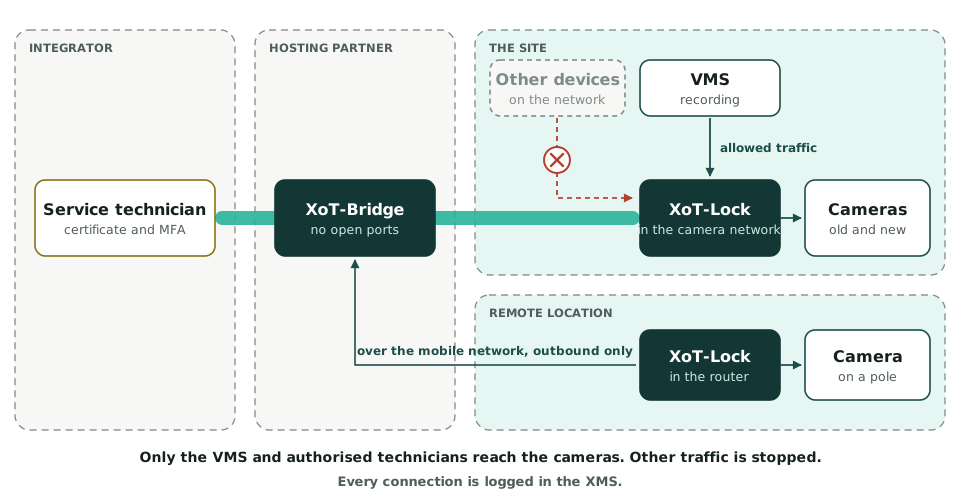
| The camera is visible on the network | Only the video management system (VMS) and authorised technicians reach the cameras. To everyone else they are invisible. |
| Traffic to unknown destinations | The Lock can stop traffic out of the cameras. A policy decides which traffic may go in and out, for example only to the VMS. |
| The socket at the camera | The Lock sits between the camera and the switch. Anyone who plugs in a computer there reaches only what the camera may reach. |
| 802.1X requirements | The Lock can authenticate to the switch on behalf of cameras that do not support 802.1X themselves. |
| Remote access for service | The technician gets access to the right camera or VMS for a set time. The customer can approve each request. No ports are opened. |
| Remote locations | A Lock in the router connects outbound over the mobile network. Traffic is encrypted on its way to the site. |
| Old cameras | The Lock protects cameras that no longer get updates until they are replaced. |
| Traceability | The XMS logs who reached which camera, when and for how long. |
Capacity
One Lock for one camera or a group of cameras
One Lock can protect a single camera or a group of cameras. How many depends on how much video the cameras send. If you need more capacity, the Lock can run as software on more powerful hardware. We help you work it out.
One Lock per group also divides the network into smaller parts. That is called micro-segmentation.
Regulations
Rules that affect the cameras
| Rule | What it means for the cameras |
|---|---|
| GDPR and national video surveillance laws | Camera images are often personal data. They must be protected with appropriate technical measures. XoT limits who reaches the cameras and logs the access. |
| NIS2 | For organisations in scope, the camera system is among the systems that must be protected. |
| Cyber Resilience Act | From 11 December 2027 there are requirements for new cameras. Smart home cameras count as important products. Cameras already installed are not affected. |
| National security legislation | Organisations that matter for national security need to assess the cameras as a possible vulnerability. |
XoT logs who reached the cameras and the VMS over the network. Who viewed a particular recording is logged in the VMS. This is our reading of the rules, not legal advice.
Partner
Camera systems with XoT
Our partner Prudencia Security designs, installs and delivers camera systems throughout Sweden. They can build XoT into your camera system.
Common questions
Do we have to replace the cameras?
No. The Lock sits in front of the cameras. The cameras keep their addresses and settings.
Can we stop the cameras from contacting the manufacturer?
Yes. The Lock can stop all traffic out of the cameras. You can also allow certain traffic, for example only to your VMS.
Does XoT work with our VMS?
The Lock lets through the traffic the policy allows. Tell us which VMS you use, and we will check it together.
Does the Lock affect the video?
The video passes through the Lock unchanged. The Lock adds only a small delay.
How many cameras can one Lock protect?
It depends on how much video the cameras send. Sometimes one Lock is enough for a group of cameras. Sometimes you need one Lock per camera or more powerful hardware.
Start with the most exposed cameras
Choose the cameras that are most exposed or have the oldest software. We help you put a Lock in front of them.