Architecture
Well-known encryption methods and digital certificates
XoT is built on proven technology. The encryption comes from WireGuard, and identity is based on digital certificates. This page describes how the parts work.
15
patent claims were granted by the European Patent Office. That was every claim in the application.
Twice
a minute, the user and the Lock check each other.
4 questions
decide every authorisation: who, what, where and when.
No passwords
are used. Identity is based on certificates.
Identity
Every user and device has its own certificate
A digital certificate works like an identity document for computers. In XoT, every user, every device and every system has its own certificate. The certificates follow the X.509 standard, which is common for this type of certificate.
The certificates are issued by XMS or by a certificate authority your company already uses. XoT uses no usernames, passwords or shared secrets.
A certificate you revoke stops working at the Lock immediately.
Encryption
The encryption comes from WireGuard
WireGuard is a modern technology for encrypted connections. WireGuard's code is about 4,000 lines long. That makes it possible to review in full.
WireGuard uses a small number of well-known cryptographic methods:
| Task | Method |
|---|---|
| Exchange keys securely | Curve25519 |
| Encrypt the traffic and protect it against changes | ChaCha20 with Poly1305 |
| Calculate checksums, known as hashing | BLAKE2s |
The methods are fixed in advance. So no one can force the connection to use a weaker method.
Checks
The user and the Lock check each other twice a minute
When a connection opens, the user and the Lock check each other's certificates. The check is then repeated twice a minute while the connection is open.
So the user must be authorised for as long as the connection is open, not just when it opens.
Access rules
Five questions decide every authorisation
A policy in the XMS answers five questions. The user can reach the equipment only if all the conditions are met.
Who?
The rule states which user or group may connect. The groups can come from Active Directory, LDAP or Entra ID.
What?
The rule states which equipment the user may connect to.
Where?
The policy states where the equipment is, such as country, city, address or room.
When?
The policy states when the access applies: always, once or on a recurring schedule.
How?
The policy states which protocols and ports are allowed.
The Lock
The Lock comes in several forms
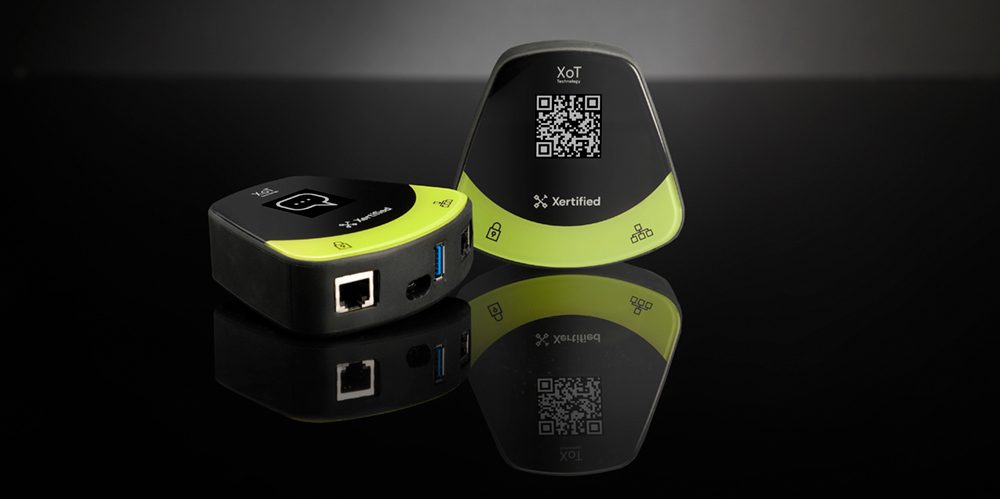
The Lock is available as the XoT-S1 hardware, which is designed and manufactured in Sweden. It is operational from −28 to 75 °C and has no moving parts.
The Lock is also available as software for 64-bit x86 and ARM64 systems. It runs on bare metal, as a virtual machine in Azure or AWS, for example, and on devices that run RutOS.
The whole of XoT can run in the cloud, in your own data centre or as a mix of both. It can also run completely separated from the internet.
Many customers
One XMS for many customers
The XMS is the server that holds the rules and the logs. One XMS can manage many customers and keep them fully separate. Each customer sees only its own equipment and approves its own requests.
You can also divide the work by geography or by type of equipment. One team can, for example, manage access control in one region, and another refrigeration across the country.
Deployment proposal
What a deployment can look like
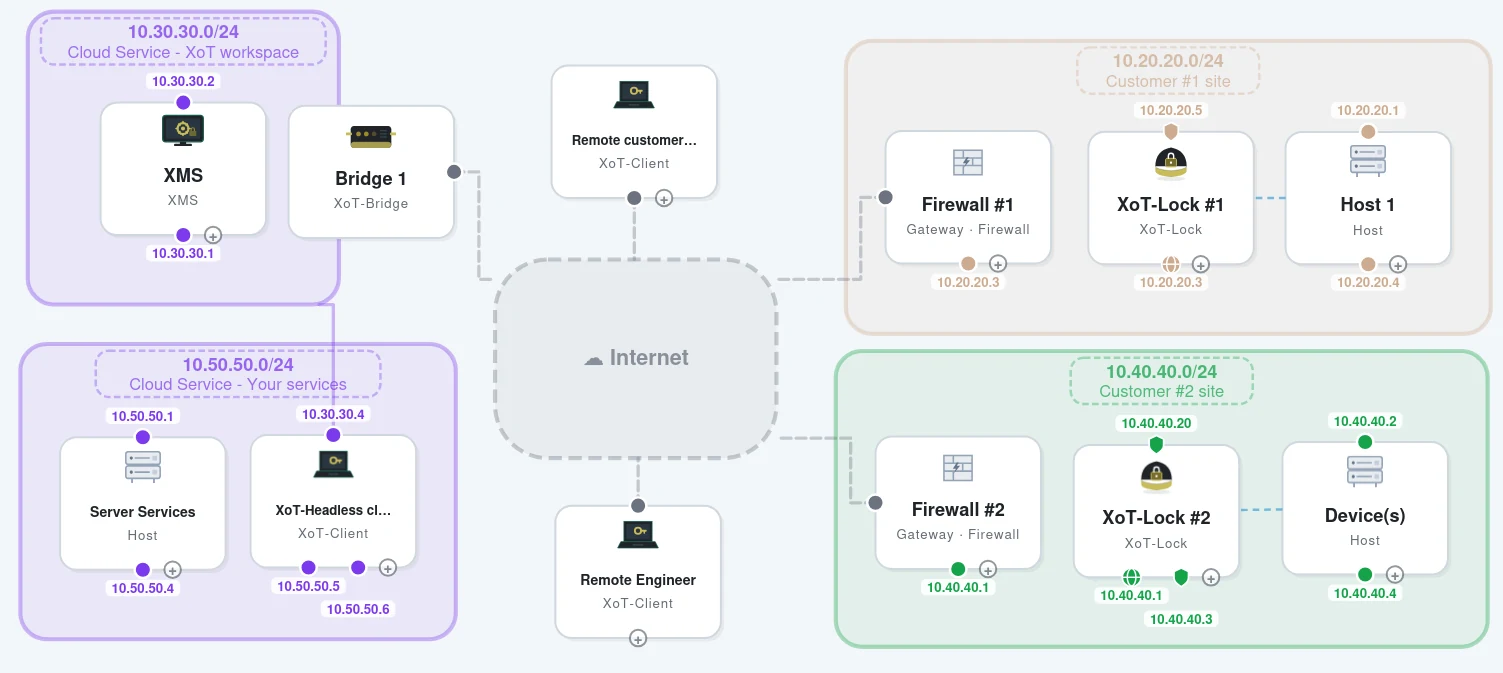
The diagram shows an example where an operations and support centre manages equipment for two customers. The XMS and the XoT-Bridge run in a cloud service. At each customer site, an XoT-Lock sits behind the firewall, in front of the equipment. Technicians connect with XoT-Clients, wherever they are.
XMS and XoT-Bridge
The XMS holds the policies and logs for all customers and keeps them apart. The bridge relays the encrypted traffic without decrypting it.
At each customer
An XoT-Lock sits in front of the equipment. The Lock connects out through the customer's firewall, so no inbound ports need to be opened.
Technicians
Technicians connect with XoT-Clients from the office or remotely. They reach only the equipment a policy allows.
The operations centre's own systems
Monitoring and alarm systems can reach customer equipment with a client that runs without a screen, the XoT Headless client.
The customer
The customer can also reach its own equipment with XoT-Clients. The operations centre and the customer decide together who may do what.
The XMS and the bridge can be run in three ways.
As a service from a partner
A partner runs the XMS and the XoT-Bridge in its data centre. You buy XoT as a service and do not have to manage the servers.
On your own
You run the XMS and the XoT-Bridge yourself, in your own data centre or in a cloud service. You then have full control over operations and where data is stored.
At the customer
The customer runs the XMS and gives the provider's technicians access. Technicians work the same way at every customer.
Open the example in Topology DesignerRead about the XMSRead about the XoT-BridgeOperations and support centres
Review
Secure development, tested and patented
Secure development
Development is based on Microsoft SDL and follows the practices in IEC 62443-4-1.
Tested against attacks
Our partners penetration-test XoT. The reports are available on request under an NDA. Would you like to run your own test? Talk to us.
European Patent Office
The application was filed in October 2019. All 15 patent claims were granted on 24 August 2021.
Common questions
Have you developed your own encryption method?
No. The encryption comes from WireGuard. What is ours is how the protection is built and where it sits.
What do we do if a certificate falls into the wrong hands?
Revoke the certificate in XMS. A certificate you revoke stops working at the Lock immediately.
Can we use our own certificate authority?
Yes. XoT can use certificates from a certificate authority your company already has.
Want to know more?
Get in touch if you would like more technical material about XoT.