XoT-Bridge
Connections across firewalls
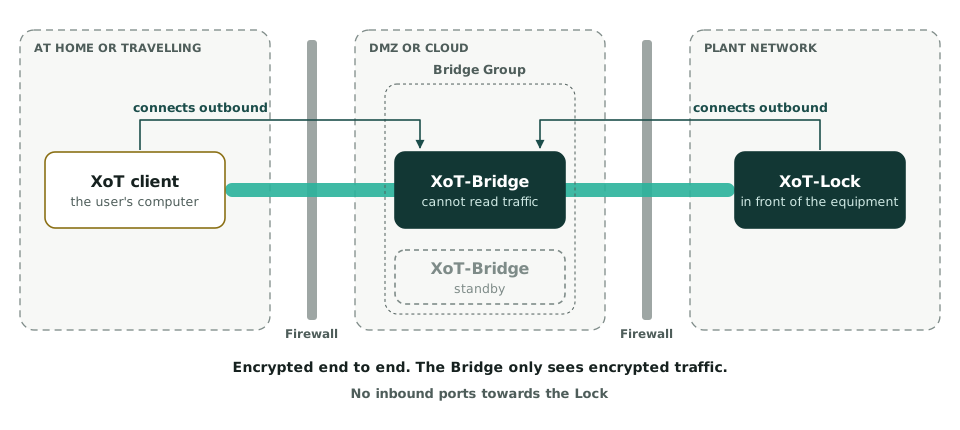
An XoT-Bridge is needed when the client and the Lock are on separate networks and cannot reach each other directly. The Bridge relays the traffic across firewalls and NAT boundaries.
Encryption
The Bridge cannot read the traffic
The Bridge relays encrypted traffic without decrypting it. It cannot inspect or modify anything. Encryption is maintained end to end between the client and the Lock.
Connection modes
Two ways to connect
Everyone calls the Bridge
This is the default mode, sometimes called rendezvous mode. Both clients and Locks connect to the Bridge and meet there. No inbound ports need to be opened towards the Lock.
The Bridge calls the Locks
This suits more traditional networks. It usually requires more firewall configuration.
Redundancy
Several Bridges in a group
Bridges are organised in Bridge Groups. If one Bridge becomes unavailable, traffic is automatically routed through another Bridge in the same group.
Placement
Where the Bridge runs
The Bridge is a configuration of the same software as the Lock. It runs on the same platforms as the XoT-Lock, typically in a DMZ or in the cloud.
The same configuration supports Client Lock, where a Lock sits between a computer and the network.
Remote access without open ports
The Bridge lets vendors reach the right machine without opening your firewall.