XMS
Control who reaches what
XMS stands for XoT Management System. Administrators use it to define policies, manage users and equipment, and monitor the system. The XMS distributes settings and policies to Locks and clients.
Administration
What you do in the XMS
- manage users and their permissions
- define equipment and networks
- create and edit access policies
- monitor system health and read logs and audit trails
- reboot, update and troubleshoot Locks remotely
- see all access as a map in the Policy Graph
- manage certificates and track when they expire
- upload and distribute firmware updates
- generate ready-made client configurations
Policies
Five questions decide every policy
You do not need to be an engineer to create a policy. It answers five questions.
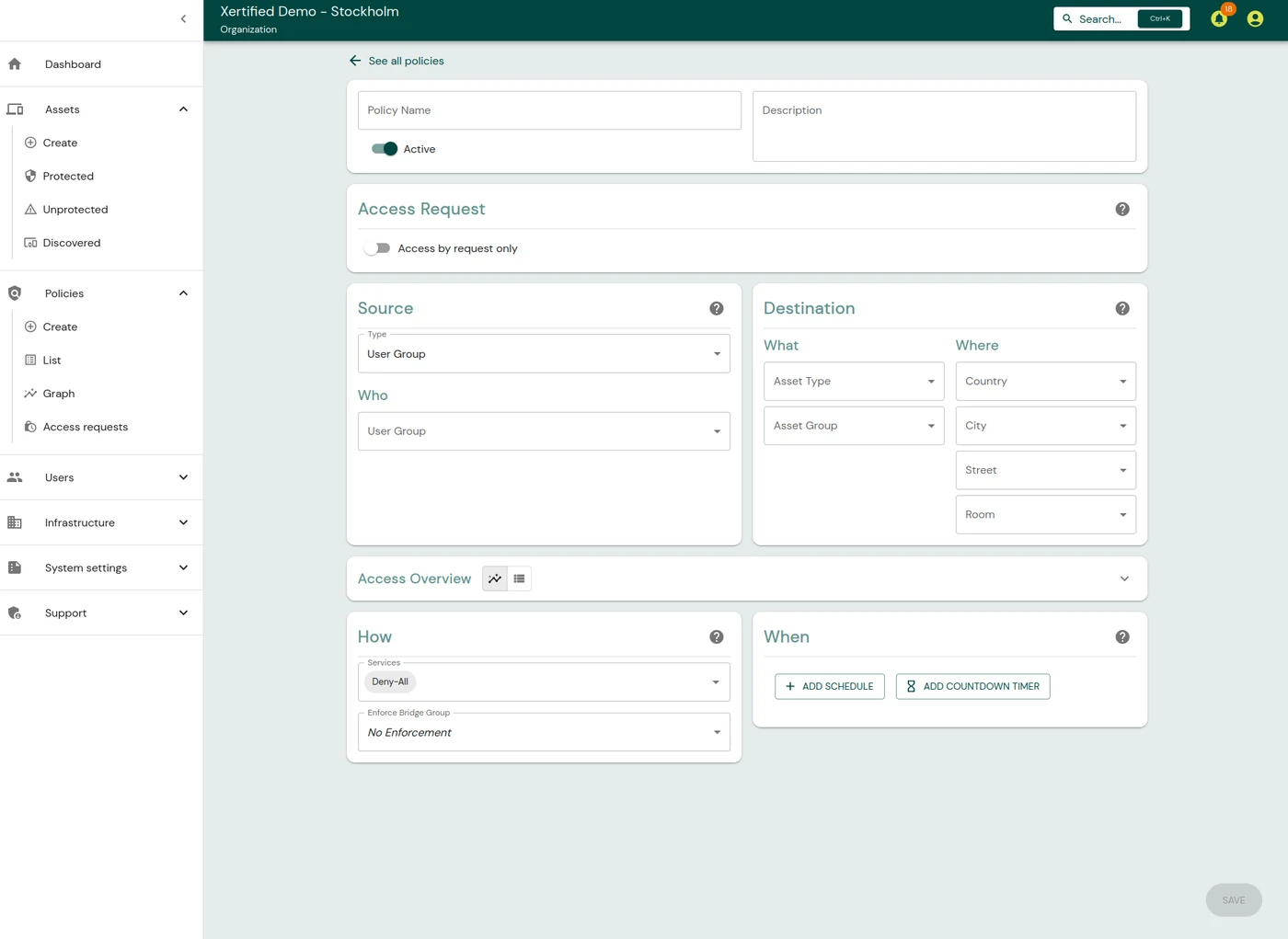
Who?
Which user groups or devices get access.
What?
Which equipment or group of equipment it covers.
Where?
Where the equipment is, such as country, city or room.
When?
When the policy applies: always, once or on a recurring schedule.
How?
Which protocols and ports are allowed.
Policy types
Four kinds of policy
| From | To | Example |
|---|---|---|
| User group | Protected asset | Users reach servers, devices or networks |
| Protected device | Protected device | Two machines behind different Locks talk to each other |
| Protected device | Unprotected device | Controlled outbound traffic from a protected network |
| Unprotected device | Protected device | Controlled inbound traffic from an external system |
The Policy Graph shows all policies as a map. It shows how users, groups, policies and equipment relate, so you can answer "who can access what?" at a glance.
Users
Users and roles
The XMS gets users and groups from any of these sources:
- a built-in identity service supporting OIDC and OAuth 2.0
- Microsoft Entra ID
- LDAP and LDAPS
Administrators can have different roles. A role might, for example, manage equipment but not policies. Roles can also be limited to a location or a type of equipment, so you can split the work between teams or regions.
| Role in the XMS | Allowed to |
|---|---|
| Superadmin | Everything |
| Admin | Almost everything, except uploading firmware and managing group sync |
| Asset Manager | Manage equipment |
| Policy Manager | Create and manage policies |
| Policy Activator | Activate scheduled policies |
| Client | Reach equipment through policies, without administration rights |
Equipment
Organising equipment
Equipment is organised by location, type and group. Location has four levels: country, city, address and room. The type can be a server, a printer or a PLC.
A policy can therefore be broad, such as all servers in Stockholm. Or it can be narrow, such as the database servers in room 401.
Locks discover new equipment when it requests an address over DHCP. It appears in the XMS, where an administrator can review it and adopt it.
Security
Tickets that expire
The XMS issues access tickets based on the policies that apply to the user. A ticket is cryptographically signed and valid for a set time. When it expires, the connection is closed. An administrator can also revoke access immediately.
Established connections keep working as long as their tickets are valid, even if the XMS is briefly unavailable. Users are not affected by short outages or maintenance windows.
Encrypted channel
Locks and clients talk to the XMS over MQTT. The channel uses TLS with mutual certificate authentication.
Built-in or external certificates
The XMS issues X.509 certificates with a built-in certificate authority. It can also use an external one, such as Net iD Portal.
New Lock
How a Lock is enrolled
- The Lock shows an enrolment address, through a QR code or a command.
- An administrator opens the address, logs in to the XMS and approves the Lock.
- The XMS issues a certificate for the Lock.
- The XMS delivers the settings to the Lock, encrypted.
- The Lock connects to the XMS and is now managed from there.
See the XMS in action
We are happy to show how a policy is created and what the Policy Graph looks like.