Hide and Protect
Micro-segmentation without rebuilding the network
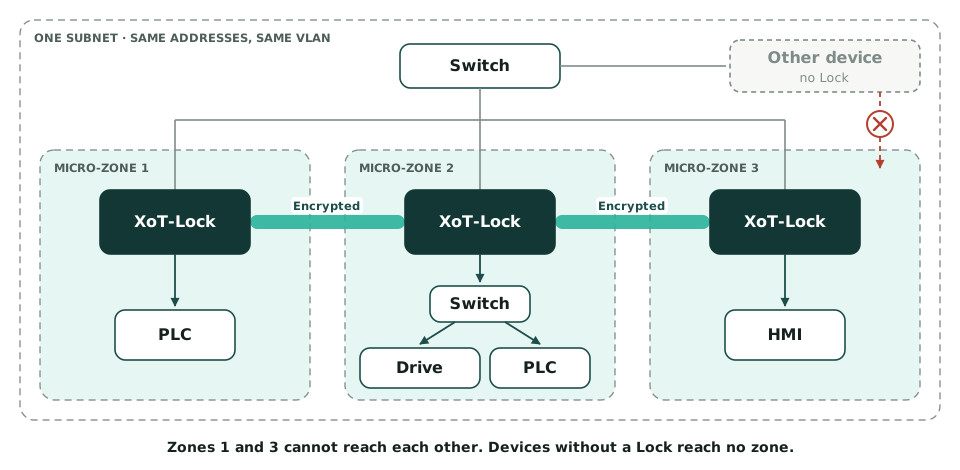
Each machine or group of machines gets its own zone. The zones can only reach each other in the ways a policy allows. The equipment keeps its addresses, and nothing is installed on it.
Micro-segmentation
Small zones instead of one large network
Many industrial networks are flat. All equipment can then reach all other equipment. An attacker who gets into one computer can therefore move on to the control systems.
Traditional segmentation divides the network into a few large parts, such as office and production. Micro-segmentation goes further. Each machine or small group of machines gets its own zone. Only the traffic a policy allows passes between the zones.
Why it is hard
Why many projects stall
Micro-segmentation sounds simple. In industry, projects still tend to run into the same obstacles.
The network has to be rebuilt
With conventional tools, equipment gets new addresses or new VLANs. That requires downtime in plants that can rarely stand still.
Software cannot be installed
Many tools need an agent on every device. Such an agent cannot be installed on a PLC or an old control system.
Nobody knows which traffic is needed
Without a picture of the traffic, new policies block things production needs. So many never dare to switch the policies on.
The rules are based on addresses
A firewall lets traffic through from certain addresses. Anyone who takes over such an address gets through too.
With XoT
How XoT makes the work easier
The addresses stay
The Lock sits between the switch and the equipment. The equipment keeps its IP address, VLAN and settings. The zones can even sit within one and the same subnet.
Nothing is installed on the equipment
The Lock sits outside the equipment. So it also suits equipment that cannot be updated.
Policies based on real traffic
Traffic Discovery records who talks to whom, on which ports and how much. The policies are based on what actually happens on the network.
No traffic is blocked until the last step
First the Lock lets everything through while the traffic is recorded. Then you activate the policies one zone at a time. That reduces the risk of production stops.
Encrypted between zones
Traffic between two zones runs in an encrypted tunnel between the Locks. It only uses the ports the policy specifies.
All policies in one place
You create the policies in the XMS. The Policy Graph there also shows who can reach what.
Seven steps
From a flat network to micro-zones
The guide describes the work in seven steps. Here they are grouped into three parts.
Plan – steps 1 and 2
List the equipment and rate how critical it is. Then decide which zones you need and which equipment sits behind which Lock.
Install and learn – steps 3 to 5
Install the Locks and create a temporary policy that lets everything through. Then switch on Traffic Discovery. Let it record traffic over a full operating cycle, with every shift and weekly job.
Tighten the policies – steps 6 and 7
Turn the recorded traffic into policies and review them with the people responsible for operations. Activate the policies one zone at a time, starting with the least critical.
The temporary policy is kept. If something stops working, you can switch it back on in seconds.
Good to know
What you need to know before you start
- Traffic between devices in the same zone does not pass through the Lock. So that traffic is not filtered.
- The Lock only passes IP traffic. Devices that talk to each other at layer 2 must therefore sit behind the same Lock. This applies to PROFINET RT and GOOSE, for example.
- A Lock handles a certain amount of encrypted traffic. So plan for large data flows between zones. The software Lock is a better fit for the largest flows.
- Micro-segmentation requires the Hide and Protect licence. With Remote Access alone, the Lock cannot block traffic on the local network.
Common questions
Do we have to change addresses or VLANs?
No. The equipment keeps its IP address, netmask, gateway and VLAN. The Lock gets its own address on the network.
How long should Traffic Discovery record traffic?
For a full operating cycle. That means every shift, every batch and the jobs that run each week, such as backups. A flow that only happens once a month will otherwise be blocked later.
Can a zone span several subnets or VLANs?
Yes. A zone can span several subnets and VLANs. It can also sit inside a single subnet.
How many Locks do we need?
Each zone has its own Lock. You get the best protection with one Lock per machine. Devices that talk to each other at layer 2 must still sit behind the same Lock.
How do people reach the equipment?
Operators, engineers and vendors connect with the XoT-Desktop Client or XoT-WebAccess. Their policies can be time-limited. Policies between machines are permanent.
Who helps us if we get stuck?
Your partner provides first-line support. For harder questions, the partner gets help from us at Xertified.
Start with one zone
Choose the part of the network you worry about most. The guide shows you how, step by step.