How XoT works
A Lock in front of the equipment and access for the right person
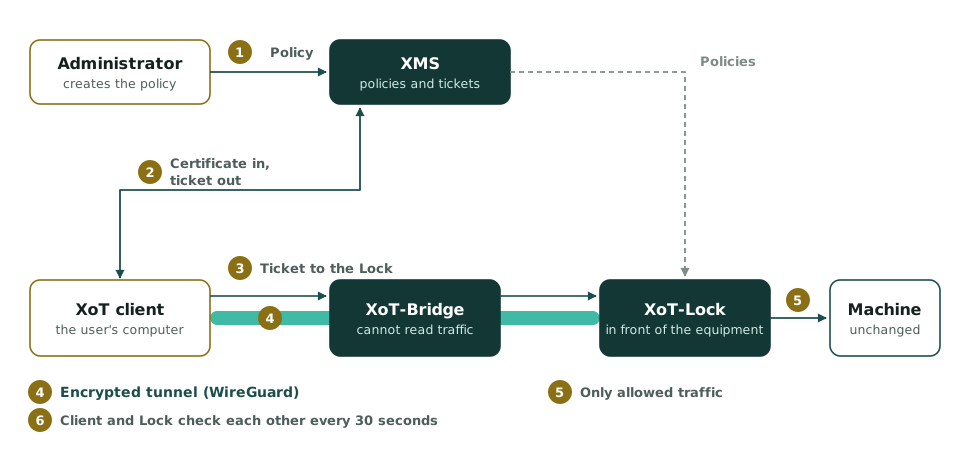
XoT has four parts. The Lock protects the equipment. The client opens the connection. The Bridge relays the traffic. In the XMS you decide who may connect to what.
The parts
The four parts of XoT
XoT-Lock, the Lock
You install the Lock next to the equipment it protects. It only lets through traffic that a policy allows. The Lock is available as the XoT-S1 hardware, as a virtual machine and as software.
XoT clients
The client authenticates with a certificate and opens the connection to the Lock. It is available as a desktop application, in the browser and built into every Lock.
XoT-Bridge
The Bridge relays the traffic between the client and the Lock. So no inbound ports need to be opened towards the Lock.
XMS
The XoT Management System is where you create access policies. There you decide who may connect, to what, where, when and how.
Step by step
How a connection works
- You create a policy in the XMS. Without a policy there is no access.
- The client connects to the XMS. The XMS verifies the client's certificate and issues an access ticket.
- The client contacts the Lock, directly or through the Bridge. The Lock verifies the ticket.
- The client and the Lock set up an encrypted WireGuard tunnel.
- The Lock only lets through the traffic the policy allows. It stops all other traffic.
- The client and the Lock check each other every 30 seconds while the connection is open.
- When the ticket expires, the connection is closed. An administrator can also close it immediately.
Where the protection sits
The Lock also protects against traffic from inside
A firewall between the network and the internet stops traffic coming from outside. But it does not see traffic between computers on the same network. So if an attacker takes over a computer on the network, they can reach other equipment there.
The Lock sits directly in front of the equipment. So it protects against traffic from both outside and inside.
Firewall
It protects against traffic from outside. It does not see traffic between computers on the same network.
Divided network
The computers are placed in groups that are protected from each other. Dividing the network often requires rebuilding it and stopping operations.
XoT
The Lock protects the equipment it sits in front of. You do not need to rebuild the network.
The equipment
The equipment works as usual
You install nothing on the equipment you protect. That matters for certified equipment and for equipment that can no longer be updated.
The equipment stays unchanged
The protection is in the Lock. The equipment and its settings stay as they are.
The address stays the same
The equipment keeps its address and its place on the network.
The network stays unchanged
You do not need to change the network, the firewall or how traffic is routed.
Common questions
Is XoT a firewall?
No. A firewall lets traffic through according to rules about addresses and ports. The Lock lets through only traffic from someone with a valid certificate. It stops everything else without responding.
Is XoT a VPN?
No. XoT encrypts the traffic with WireGuard, which is a VPN technology. But a VPN connects a user to a whole network. XoT connects a user to specific equipment.
Where can XoT run?
XoT can run in the cloud, in your own data centre or as a mix of both. It can also run completely separated from the internet.
Does XoT work over the mobile network?
Yes. XoT works over any IP network. That includes mobile networks and connections between several sites or organisations.
See how XoT works at your site
One machine and one Lock are enough to get started.